Professional 20oz Skinny Tumbler Mockup: Canva & PSD Files
When you are preparing to launch a new line of drinkware or showcase a custom design for a client, the presentation is just as important as the artwork itself. In the crowded marketplace of Etsy, Amazon, or personal Shopify stores, a flat image of a design file rarely convinces a customer to make a purchase. They need to visualize the product in their hands, on their desk, or in their car. This is where the 20Oz Skinny Tumbler Mockup Canva + PSD becomes an indispensable tool for your creative workflow. It bridges the gap between a digital concept and a tangible product, allowing you to display your graphics with photorealistic precision.
This specific mockup package is designed with versatility in mind, catering to both the beginner who prefers the drag-and-drop interface of Canva and the professional designer who requires the granular control of Photoshop. The visual aesthetic of the mockup is clean, modern, and highly polished. It mimics the natural curvature and lighting of a standard stainless steel skinny tumbler, ensuring that your designs wrap seamlessly around the cylindrical surface. The resolution is substantial—coming in at 5376 x 3584 pixels—which ensures that even when zoomed in, the texture of the design and the reflection of the tumbler remain crisp. This level of detail is crucial for building trust with your audience, as it signals professionalism and high production value.
Streamlining Your Design Workflow with Smart Objects
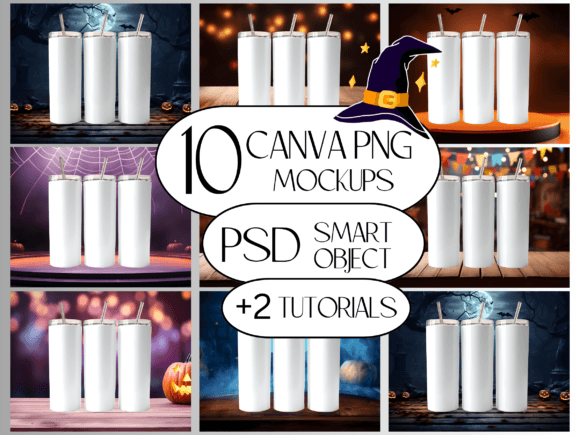
One of the most significant advantages of using this specific asset is the inclusion of Smart Object layers within the PSD file. For those using Adobe Photoshop or the free browser-based alternative, Photopea, this feature is a game-changer. Instead of manually warping your artwork to fit the curve of the tumbler—a process that often leads to distortion and frustration—you simply double-click the smart object layer, paste your design, save, and watch it automatically conform to the shape of the cup. The package includes 10 free backgrounds, allowing you to set the scene without needing to search for additional stock photography. Whether you want a rustic wooden table for a farmhouse aesthetic or a clean marble counter for a modern kitchen vibe, the options are built right in.
For users who prefer Canva, the High Resolution PNG file serves as the perfect overlay. The workflow is intuitive: you upload the PNG mockup to your Canva workspace, place your design underneath the layer, and use clipping masks or positioning to achieve the desired look. This accessibility makes the 20Oz Skinny Tumbler Mockup Canva + PSD an excellent choice for small business owners who may not have extensive technical training in graphic design but still need professional results. The inclusion of video tutorials further lowers the barrier to entry, guiding you through the process of working with PNGs in Canva and utilizing smart objects in Photoshop.
Visualizing Brand Identity and Packaging Design
Understanding how a design translates onto a physical object is a critical component of brand identity. A pattern or logo that looks great on a flat screen might look entirely different when curved around a narrow vessel. This mockup allows you to test your packaging design concepts in real-time. You can evaluate how your logo design sits on the tumbler, ensuring it doesn't get lost in the curve or distorted by the reflection of the metal. It is also an invaluable tool for social media graphics. High-quality mockups stop the scroll on Instagram and Pinterest. By presenting your designs in a realistic setting, you create an emotional connection with potential buyers, helping them imagine the product in their own lives.
Furthermore, this tool is essential for maintaining consistency across your marketing materials. If you are a content creator or a blogger, you might use this mockup to showcase merchandise. If you are a marketer, you can use it to visualize promotional items for a corporate event. The versatility of the 20Oz Skinny Tumbler Mockup extends to various niches, from wedding favors and bachelorette party gifts to corporate branding and seasonal merchandise. It acts as a design asset that pays for itself by saving hours of manual editing time and eliminating the need to order physical samples for every single colorway or design variation you wish to test.
Practical Application and Commercial Use
From a practical standpoint, the technical specifications of this file are robust. The compatibility with Photoshop CS6 and newer versions ensures that even users with older software can utilize the files effectively. The high resolution makes the mockups suitable for print catalogs and large-scale web banners alike. When you are evaluating a premium font or a new typeface for your tumbler designs, this mockup allows you to test readability immediately. You can see how a sans serif font compares to a script font on the curved surface, ensuring your text remains legible and visually appealing.
It is also important to understand the terms of use associated with this product. While the license is generous—allowing for both personal and commercial use—it strictly prohibits the resale or redistribution of the files themselves. You cannot resell the mockup template as your own or incorporate it into a digital product bundle to give away to third parties. This protects the original creator’s work while giving you the freedom to use the mockup to sell your finished, customized tumbler designs. This distinction is vital for entrepreneurs and small business owners to understand to ensure they remain compliant while leveraging the tool for profit.
Enhancing Professionalism in Client Presentations
For freelance designers and agencies, presenting concepts to clients can often be a hurdle. Showing a client a flat graphic on a white background often fails to excite them. By using the 20Oz Skinny Tumbler Mockup Canva + PSD, you elevate your presentation. You can show the client exactly what their product will look like before a single unit is manufactured. This not only impresses the client but also reduces the number of revisions, as they can visualize the end result clearly.
The ability to swap out backgrounds easily means you can tailor the presentation to the client's specific market. If the tumbler is for a yoga studio, place it on a mat with a water bottle nearby. If it is for a corporate gift, place it on a mahogany desk with a leather planner. This contextual storytelling is a powerful tool in editorial design and product marketing. It transforms a simple product image into a lifestyle shot that speaks to the target audience's aspirations.
Ultimately, this mockup is more than just a digital file; it is a production tool. It allows crafters and hobbyists to experiment with complex patterns without wasting vinyl or sublimation paper. It allows professionals to build a cohesive library of product images for their web design projects and online storefronts. By integrating this asset into your workflow, you are not just buying a picture of a cup; you are investing in a more efficient, professional, and visually compelling way to bring your creative ideas to market. The combination of high resolution, smart object functionality, and ease of use makes it a staple for anyone serious about product-based design.