Effortless Payments: A Canva Template Solution
In the bustling environment of a local craft show or a busy street fair, clear communication is your most valuable asset. You have seconds to convey professionalism and build trust with a potential customer. One of the most frequent points of friction at these events is payment confusion. A customer with a handful of cash or a specific card asks, "Do you take...?" This moment of uncertainty can disrupt your flow and, in some cases, lose a sale. The solution is a professional, clear, and visually appealing payment method sign. A well-designed Payment Method Printable acts as a silent salesperson, instantly informing customers and streamlining your checkout process.
More Than a Sign: Your Brand's First Impression
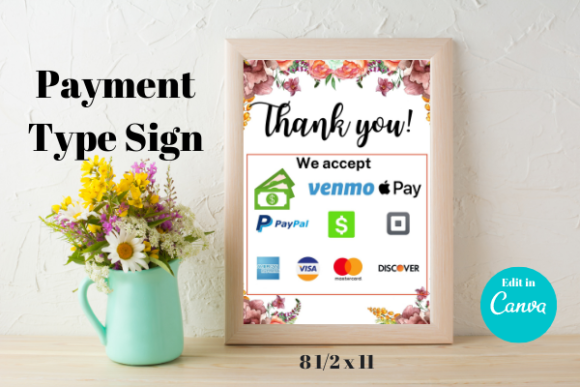
This Canva Template is not just a list of accepted payments. It's a strategic design asset. The template is built with a focus on modern typography and bright, eye-catching color palettes. The visual personality is clean, friendly, and trustworthy. It uses a combination of bold sans serif font for headers and clear, legible text for the payment icons, ensuring maximum readability from a short distance. The style avoids clutter, using negative space effectively to guide the viewer's eye directly to the information that matters. This design choice reflects a modern approach to brand identity, where clarity and user experience are paramount. The overall appeal is one of organized professionalism, telling your customer, "We are prepared, we are legitimate, and your transaction will be smooth."
Practical Applications for the Savvy Entrepreneur
The primary use case is, of course, your vendor booth. Sized for standard 8.5" x 11" paper, it fits perfectly into the clear acrylic frames commonly found at craft fairs. Placed at the front of your table or right next to your point-of-sale system, it answers questions before they're asked. But its utility extends far beyond a weekend market. Consider these practical applications:
- Small Business Retail: For a boutique, bakery, or studio, this sign can be displayed at the register. It maintains a consistent and professional look that complements your interior design, especially when placed in a more decorative frame that matches your store's aesthetic.
- Pop-Up Shops and Collaborations: When you partner with another business for a pop-up event, your branding needs to be portable and adaptable. This template allows you to quickly create a sign that feels cohesive with the host location while still representing your own brand.
- Side Hustles and Service Providers: If you're a photographer at a mini-session event, a consultant meeting a client at a coffee shop, or a tutor working from a library, having a small, professional sign for your table communicates preparedness and legitimacy.
The Power of Customization in Canva
The true value of this product lies in its flexibility. You receive a fully editable Canva template, not a static PDF. This is a critical distinction. You are not locked into a specific color scheme or font choice. With a free Canva account, you can open the template and make it uniquely yours. This level of control is essential for maintaining a strong brand identity.
You can easily adjust the colors to match your existing logo and marketing materials. If your brand uses a specific script font or a distinctive serif font, you can change the typography to reflect that. You can move elements around, resize the payment icons, and even add your own business logo to the design. This transforms the template from a simple sign into a cohesive piece of your overall marketing and publishing toolkit. It becomes an extension of your brand's visual language, reinforcing recognition and building trust with every interaction.
A Step-by-Step Guide to Your Custom Sign
Getting your sign ready is a straightforward process designed for efficiency, even if you're not a professional designer.
- Access Your Template: After purchase, you will receive a PDF containing a direct link to your template. Clicking this link will open the design directly in Canva.
- Personalize Your Design: This is where the creative work happens. Change the text, swap out colors, and upload your logo. Experiment with different font pairings to see what best represents your brand's personality. The goal is to create a design that feels authentic to your business.
- Save and Download: Once you are satisfied with your design, save your work within Canva. Then, download the file as a high-quality PDF for printing. This ensures crisp lines and vibrant colors, whether you're using a home printer or a professional print shop.
- Print and Display: Print your design on a sturdy cardstock for durability. Place it in a frame and position it prominently at your booth or business location. The clear, bold design will do the rest, working to enhance your customer's experience from the moment they approach.
In the world of small business, details matter. A thoughtfully designed payment sign is a small investment that pays dividends in professionalism, efficiency, and customer confidence. It’s a practical design asset