Editable Brand Board Template: Streamline Your Visual Identity
Building a consistent brand identity is one of the most challenging aspects of running a business, especially when you are trying to balance multiple design assets across different platforms. You might have a beautiful color palette in mind, but translating that into a cohesive visual language that includes fonts, textures, and logo variations requires organization. This is where the Editable Brand Board Template becomes an essential tool for designers, entrepreneurs, and content creators. It serves as a centralized hub for your visual identity, ensuring that every piece of marketing you release looks intentional and professional.
Why a Digital Brand Board Matters
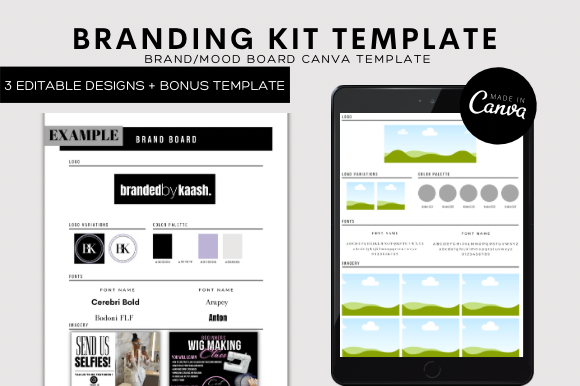
In the world of modern typography and graphic design, consistency is king. A brand board is not just a mood board; it is a strategic document that outlines the specific elements that make up your brand’s visual personality. By using a pre-designed layout, you bypass the struggle of formatting and can focus entirely on the creative strategy. This template is designed to hold your primary and secondary logos, your specific color codes (HEX, RGB, CMYK), your selected serif font, sans serif font, or script font pairings, and key texture or pattern swatches.
The visual characteristic of a well-structured brand board is clarity. It allows clients or team members to glance at a single page and immediately understand the "vibe" of the brand—whether it is minimal and corporate, or bold and artistic. For small business owners, this document acts as a North Star. It prevents the common mistake of using off-brand colors or mismatched typefaces, which can confuse your audience and dilute your brand recognition.
Harnessing the Power of Canva
One of the standout features of this product is its accessibility. You do not need expensive software like Adobe InDesign or Illustrator to create a high-end result. This template is 100% editable in Canva, a powerful, web-based design platform that is free to use. This levels the playing field for bloggers, publishers, and hobbyists who want premium design quality without the premium software subscription.
The process is straightforward. Upon purchase, you receive a digital file—specifically a PDF containing a direct link to the template in Canva. There is no shipping required, meaning you can start working on your brand identity immediately. Once you click the link and create a free Canva account (if you haven't already), the template opens in the editor. You can access this from your desktop, tablet, or even your phone, though a desktop is recommended for the precision required in design work.
Customizing Your Visual Assets
The true value of this Editable Brand Board Template lies in its flexibility. It is a starting point, not a rigid constraint. You can easily swap out the placeholder text for your own business name and tagline. If you have a specific handwritten font or a modern typography choice you want to feature, you can upload it to Canva or select from their vast library of free fonts.
Here is how you can maximize this template for your specific needs:
- Color Palette: Click on the color swatches and input your specific brand HEX codes. This ensures that anyone you share the board with can replicate your exact colors.
- Photography Style: Use the image placeholders to insert your own photos or stock photos that represent your brand's aesthetic. This helps in defining the mood—whether it’s airy and bright or dark and moody.
- Logo Variations: Upload your primary logo, submark, and favicon. The layout is designed to display these clearly so you can see how they interact with your chosen display font and color palette.
Practical Applications for Entrepreneurs and Creators
This template is not just for professional graphic designers. It is an invaluable asset for a wide range of users. If you are a social media manager, having a brand board allows you to quickly brief new team members or freelancers on your visual guidelines. For packaging design, having a reference sheet ensures that your physical products match your digital presence perfectly.
Consider a scenario where you are launching a new product line. You need to create web graphics, email headers, and social media posts. Without a brand board, you might find yourself guessing at font sizes or colors, leading to a disjointed look. With this template, you simply refer back to your board. It acts as a style guide that keeps your marketing cohesive. This consistency builds trust with your audience; when they see your content, they recognize it instantly because the visual hierarchy and style remain constant.
Design Observations and Best Practices
When editing your brand board, pay attention to the balance between text and imagery. A common pitfall is overcrowding the layout. Leave enough negative space to let the design breathe. If you are using a decorative script font for your headings, pair it with a clean sans serif font for body text to ensure readability.
Furthermore, think about the versatility of your brand elements. Your brand board should represent elements that work across different mediums. For example, ensure your color palette is accessible and provides enough contrast for web design. Check that your chosen typeface is legible at small sizes for mobile viewing. The template provides the structure, but you provide the strategic thinking to make the brand functional.
Getting Started with Your Download
Once you have downloaded the file, the workflow is seamless. Open the PDF, click the access link, and you are taken directly to the Canva editor. From there, it is simply a matter of "point and click." Change the text, drag and drop your images, and adjust the colors. Because Canva saves your work automatically, you can revisit and tweak your brand board as your business evolves.
This Editable Brand Board Template is designed to save you significant time. Instead of building a layout from scratch, you are refining a professional design. It is a practical solution for anyone serious about their brand identity, offering a blend of professional structure and user-friendly editing that suits the modern creative workflow.